PiNet Metadata
Table of contents
Overview
PiNet provides a dedicated subdomain for your app under *.pinet.com (for example, https://example.pinet.com). This gives you a stable, clean URL your users can utilize to access your app (including from within Pi Browser).
PiNet also provides support for exposing metadata tags on behalf of your application. The most practical use of this feature is proxying HTML meta tags responsible for Facebook Open Graph and Twitter Cards thumbnails which can further increase your app recognition and growth.
As of now there are two ways in which you can make use of the feature, which further down this documentation we’ll refer to as frontend and backend flows.
PiNet Subdomain
You can configure your PiNet subdomain from the Pi Developer Portal:
- Open your app in Developer Portal and go to PiNet Settings.
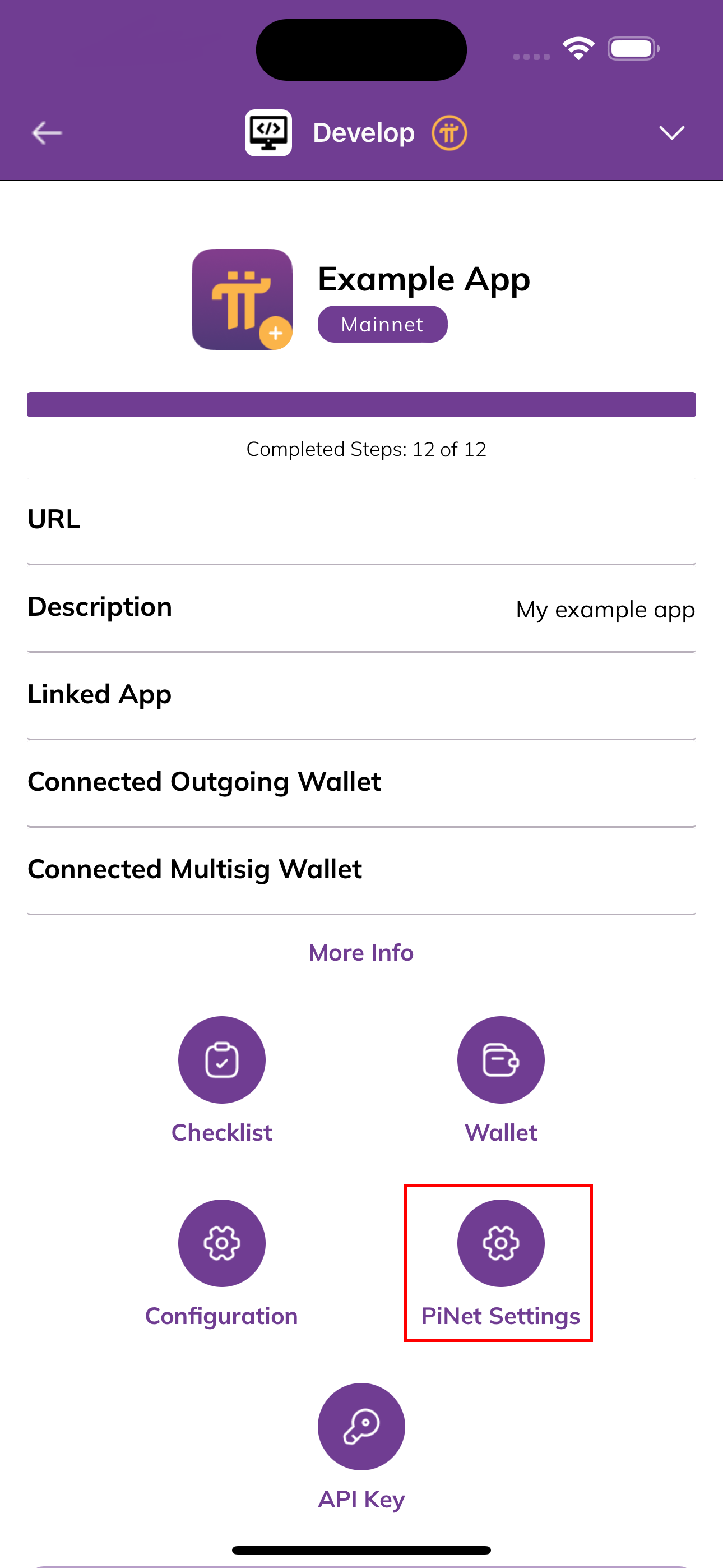
- Note: before configuring PiNet settings, the app must have a validated domain registered in the Pi Developer Portal.
- Set PiNet Subdomain (for example,
example) and submit your changes.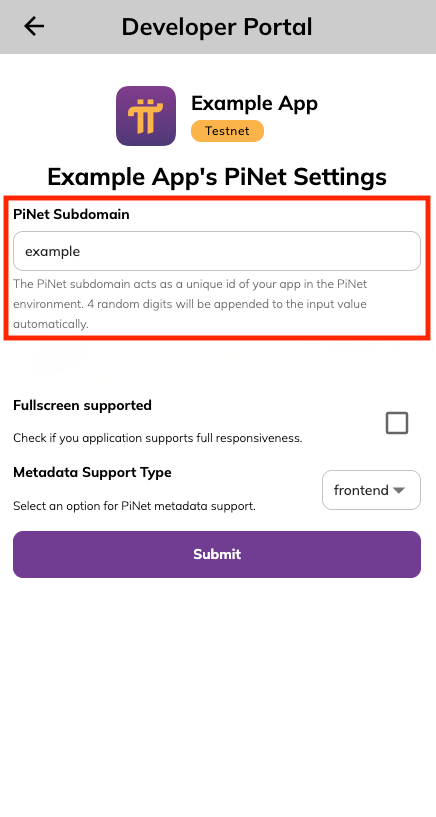
Your app will then be accessible at a *.pinet.com URL like https://example.pinet.com.
Note: the Developer Portal will append 4 random digits to your chosen subdomain to ensure uniqueness.
Frontend Metadata Support
The frontend metadata support option is default for all apps registered on PiNet. It involves PiNet scraping data from your application’s frontend in a similar way bots do and then exposing it on your behalf. As a developer you simply need to take care of exposing proper meta tags from your HTML files without worrying about how PiNet would then scrape them. A useful tool for validating your HTML files is metatags.io. If the meta tags you’re interested in exposing are present there, they should be automatically picked up by PiNet as well if the frontend flow is selected.
The frontend metadata support is a relevant option for developers who:
- are interested in exposing single set of metadata for whole app, or
- are interested in exposing dynamic metadata per page while developing a SSR app.
Backend Metadata Support
The frontend flow, despite how simple it is and how little custom configuration it requires from developers who make use of web and SSR frameworks, may be inconvenient to use for Single Page Application developers. Therefore PiNet also exposes a custom solution which involves backend communication between PiNet and your application so that if you’re developing a Single Page Application you can have your pages generate metadata tags dynamically.
Prerequisites
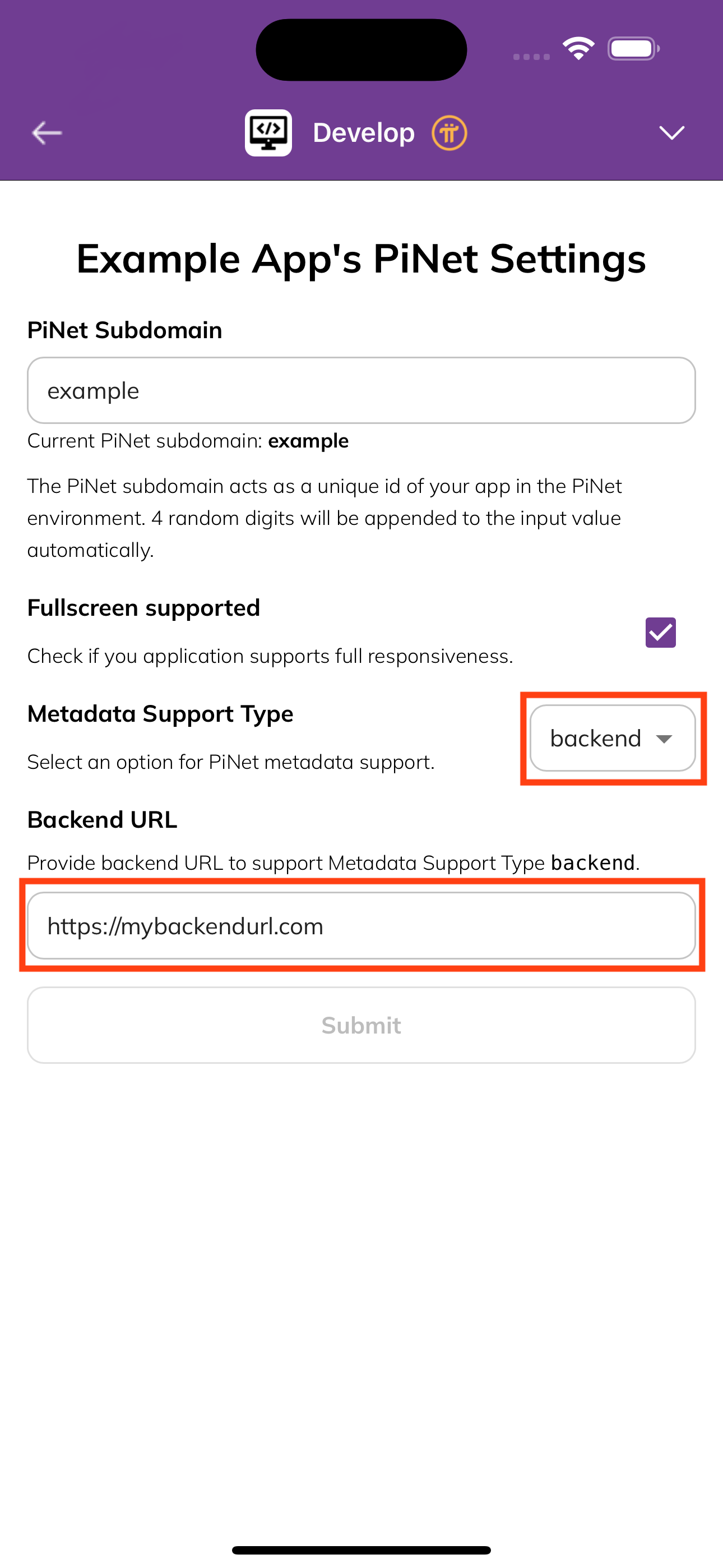
Before using backend metadata support option, first it must be selected in Pi Developer Portal app. Go to Pi Developer Portal application, select the application you want to enable backend PiNet metadata support for, and go to “PiNet Settings”. There, select backend option for Metadata Support Type field and provide valid backend URL.
Backend Setup
When backend metadata support type is selected, PiNet sends GET requests to your backend endpoint at /pinet/meta?pathname=<encoded-pathname> passing the pathname of the url as search param.
E.g. for PiNet application with PiNet subdomain example (available at https://example.pinet.com), when https://example.pinet.com/faq/1 URL is used, PiNet would send GET request to https://examplebackendurl.com/pinet/meta?pathname=%2Ffaq%2F1' and expect it to respond with a DTO of PiNetMetadataDTO shape. If the response is of HTTP status code 200 and of proper shape, PiNet will expose the metadata outside.
Types
PiNetMetadataDTO
PiNet expects you to respond with PiNetMetadataDTO type. All of the fields at the top level of the DTO are optional so if you don’t feel like providing all of the metadata details, you don’t need to. However, some of the nested types if provided, require you to provide corresponding mandatory fields.
In the type aliasses definitions below, all fields that contain a ? immediately after the key indicate an optional field. Ex. title?: indicates an optional field while title: would be a required field.
type PiNetMetadataDTO = {
  title?: string;
  description?: string;
  authors?: null | Author | Array<Author>;
  keywords?: null | string | Array<string>;
  creator?: null | string;
  publisher?: null | string;
  formatDetection?: null | FormatDetection;
  abstract?: null | string;
  archives?: null | string | Array<string>;
  category?: null | string;
  classification?: null | string;
  openGraph?: null | OGMetadata;
  twitter?: null | TwitterMetadata;
  icons?: null | string | Array<Icon> | Icons;
};
Below are listed the type aliases specific to default HTML meta tags, used in the PiNetMetadataDTO above:
type Author = {
  url?: string;
  name?: string;
};

type FormatDetection = {
  telephone?: boolean;
  date?: boolean;
  address?: boolean;
  email?: boolean;
  url?: boolean;
};

type IconDescriptor = {
  url: string;
  type?: string;
  sizes?: string;
  color?: string;
  rel?: string;
  media?: string;
  fetchPriority?: "high" | "low" | "auto";
};

type Icon = string | IconDescriptor;

type Icons = {
  icon?: Icon | Array<Icon>;
  shortcut?: Icon | Array<Icon>;
  apple?: Icon | Array<Icon>;
  other?: IconDescriptor | Array<IconDescriptor>;
};
OpenGraph
PiNet allows you to define OpenGraph specific metadata, which will be exposed on your behalf. The main OGMetadata type alias is a discriminated union, where the type field is the discriminant. Therefore some of the OGMetadata union members allow you to specify additional properties if the specific type is defined.
type OGMetadata =
  | OGMetadataWebsite
  | OGMetadataArticle
  | OGMetadataBook
  | OGMetadataProfile
  | OGMetadataMusicSong
  | OGMetadataMusicAlbum
  | OGMetadataMusicPlaylist
  | OGMetadataMusicRadioStation
  | OGMetadataVideoMovie
  | OGMetadataVideoEpisode
  | OGMetadataVideoTVShow
  | OGMetadataVideoOther;

type OGMetadataBase = {
  title?: string;
  description?: string;
  emails?: Array<string>;
  phoneNumbers?: Array<string>;
  faxNumbers?: Array<string>;
  locale?: string;
  alternateLocale?: Array<string>;
  images?: OGImage | Array<OGImage>;
  audio?: Array<OGAudio>;
  videos?: Array<OGVideo>;
  countryName?: string;
};

type OGMetadataWebsite = OGMetadataBase & {
  type: "website";
};

type OGMetadataArticle = OGMetadataBase & {
  type: "article";
  publishedTime?: string;
  modifiedTime?: string;
  expirationTime?: string;
  authors?: null | string | Array<string>;
  section?: null | string;
  tags?: null | string | Array<string>;
};

type OGMetadataBook = OGMetadataBase & {
  type: "book";
  isbn?: null | string;
  releaseDate?: null | string;
  authors?: null | string | Array<string>;
};

type OGMetadataProfile = OGMetadataBase & {
  type: "profile";
  firstName?: null | string;
  lastName?: null | string;
  username?: null | string;
  gender?: null | string;
};

type OGMetadataMusicSong = OGMetadataBase & {
  type: "music.song";
  duration?: null | number;
  albums?: null | string | OGAlbum | Array<OGAlbum>;
  musicians?: null | string | Array<string>;
};

type OGMetadataMusicAlbum = OGMetadataBase & {
  type: "music.album";
  songs?: null | string | OGSong | Array<string | OGSong>;
  musicians?: null | string | Array<string>;
  releaseDate?: null | string;
};

type OGMetadataMusicPlaylist = OGMetadataBase & {
  type: "music.playlist";
  songs?: null | string | OGSong | Array<string | OGSong>;
  creators?: null | string | Array<string>;
};

type OGMetadataMusicRadioStation = OGMetadataBase & {
  type: "music.radio_station";
  creators?: null | string | Array<string>;
};

type OGMetadataVideoMovie = OGMetadataBase & {
  type: "video.movie";
  actors?: null | string | OGActor | Array<OGActor>;
  directors?: null | string | Array<string>;
  writers?: null | string | Array<string>;
  duration?: null | number;
  releaseDate?: null | string;
  tags?: null | string | Array<string>;
};

type OGMetadataVideoEpisode = OGMetadataBase & {
  type: "video.episode";
  actors?: null | string | OGActor | Array<OGActor>;
  directors?: null | string | Array<string>;
  writers?: null | string | Array<string>;
  duration?: null | number;
  releaseDate?: null | string;
  tags?: null | string | Array<string>;
  series?: null | string;
};

type OGMetadataVideoTVShow = OGMetadataBase & {
  type: "video.tv_show";
};

type OGMetadataVideoOther = OGMetadataBase & {
  type: "video.other";
};
Below are listed the type aliases reused across different OGMetadata union members above:
type OGImageDescriptor = {
  url: string;
  secureUrl?: string;
  alt?: string;
  type?: string;
  width?: string | number;
  height?: string | number;
};

type OGImage = string | OGImageDescriptor;

type OGVideoDescriptor = {
  url: string;
  secureUrl?: string;
  alt?: string;
  type?: string;
  width?: string | number;
  height?: string | number;
};

type OGVideo = string | OGVideoDescriptor;

type OGAudioDescriptor = {
  url: string;
  secureUrl?: string;
  alt?: string;
};

type OGAudio = string | OGAudioDescriptor;

type OGActor = {
  url: string;
  role?: string;
};

type OGSong = {
  url: string;
  disc?: number;
  track?: number;
};

type OGAlbum = {
  url: string;
  disc?: number;
  track?: number;
};
Twitter Cards
Similarly to providing support for OpenGraph protocol, PiNet allows you to define Twitter specific metadata. The main OGTwitterMetadata type alias is a discriminated union, where the card field is the discriminant. Therefore some of the OGTwitterMetadata union members allow you to specify additional properties if the specific card is defined.
type TwitterMetadata =
  | TwitterMetadataBase
  | TwitterMetadataCardSummary
  | TwitterMetadataCardSummaryLargeImage
  | TwitterMetadataCardPlayer
  | TwitterMetadataCardApp;

type TwitterMetadataBase = {
  title?: string;
  description?: string;
  creator?: string;
  creatorId?: string;
  images?: TwitterImage | Array<TwitterImage>;
};

type TwitterMetadataCardSummary = TwitterMetadataBase & {
  card: "summary";
};

type TwitterMetadataCardSummaryLargeImage = TwitterMetadataBase & {
  card: "summary_large_image";
};

type TwitterMetadataCardPlayer = TwitterMetadataBase & {
  card: "player";
  players: TwitterPlayerDescriptor | Array<TwitterPlayerDescriptor>;
};

type TwitterMetadataCardApp = TwitterMetadataBase & {
  card: "app";
};
Below are listed the type aliases reused across different OGTwitterMetadata union members above:
type TwitterImageDescriptor = {
  url: string;
  secureUrl?: string;
  alt?: string;
  type?: string;
  width?: string | number;
  height?: string | number;
};

type TwitterImage = string | TwitterImageDescriptor;

type TwitterPlayerDescriptor = {
  url: string;
  width: number;
  height: number;
};
PiNetMetadataDTO Validation Tool
The PiNetMetadataDTO can get quite complex and it may be difficult for you to verify if the DTO you respond with would pass PiNet internal validation. You can use form available on PiNet to validate if your DTO is valid.